
TLS and mutual TLS
Why mutual TLS, and not a login page
Section titled “Why mutual TLS, and not a login page”The API is reachable from the internet. Anything reachable from the internet is scanned continuously by automated tools looking for known vulnerabilities — not because anyone is interested in you, but because everything gets scanned.
A password or a bearer token is checked by the application, which means the request has already been parsed by TLS termination, an HTTP server, a router, and some middleware. Every one of those is code that can have a bug.
Mutual TLS moves the gate down to the handshake. The proxy demands a client certificate signed by your certificate authority before it will complete a TLS connection. A scanner has no such certificate, so it never gets to send a single byte of HTTP. The attack surface facing the internet shrinks to the TLS implementation itself.
The device token still exists on top of it. Two independent factors: one transport, one application.
Why a private CA, and no ACME
Section titled “Why a private CA, and no ACME”There is no public certificate authority in this design, and no Let’s Encrypt.
- The clients are yours. You know all of them, personally, and there are one or two.
- A public CA can only vouch for server identity. It cannot help with the thing that matters here, which is proving that a client is your phone.
- Certificates are issued with
openssland a Makefile, not a running CA service. This means the root key can live offline — in a password manager, brought out only when you sign something. A CA daemon must keep it online.
Key algorithm throughout: ECDSA P-256. Modern, small, well supported by Apple platforms.
The three certificates
Section titled “The three certificates”Helsa Root CA 10 years, key kept OFFLINE├── server certificate 398 days, lives on the proxy└── client certificates ├── iphone 730 days, lives in the phone's Keychain └── ipad, laptop, … one per device, never shared| Certificate | Lifetime | Why that number |
|---|---|---|
| Root CA | 10 years | Replacing it is the one operation that can lock you out. Do it rarely and deliberately. |
| Server | 398 days | Apple platforms cap how long they will trust a server certificate. 398 days is the value at which the question never comes up. Renew yearly. |
| Client | 730 days | Deliberately long. If the phone is offline longer than its certificate lives, it cannot renew — renewal needs a connection, and the connection needs the certificate. Short-lived client certificates create a deadlock. |
Issuing
Section titled “Issuing”cd helsa/deploy/pki
make ca # once, evermake server # the proxy's certificatemake client NAME=iphone # per device, produces a .p12 bundleEverything lands under pki/out/, which is git-ignored.
Set the hostnames before running make server: the SAN list lives in
server.cnf and must contain the public name the phone will use, plus any internal
name and LAN address you want to reach it by.
make ca refuses to overwrite an existing CA. That guard is intentional —
regenerating the CA silently invalidates every certificate you have issued.
Installing on the server
Section titled “Installing on the server”/opt/helsa/pki/├── ca.crt 0644 used to verify client certificates├── server.crt 0644└── server.key 0600 readable only by the proxyscp pki/out/ca/ca.crt pki/out/server/server.crt pki/out/server/server.key server:/tmp/ssh server ' sudo install -m 0644 /tmp/ca.crt /tmp/server.crt /opt/helsa/pki/ && sudo install -m 0600 /tmp/server.key /opt/helsa/pki/ && rm -f /tmp/ca.crt /tmp/server.crt /tmp/server.key && cd /opt/helsa/deploy && docker compose restart proxy'Note the rm — do not leave a private key in /tmp.
Installing on the phone
Section titled “Installing on the phone”Two separate things must go onto the device, and both are required:
1. ca.crt — so the phone trusts your server.
Transfer it (AirDrop, mail to yourself, download over LAN) and open it. iOS downloads it as a profile that you then install in Settings.
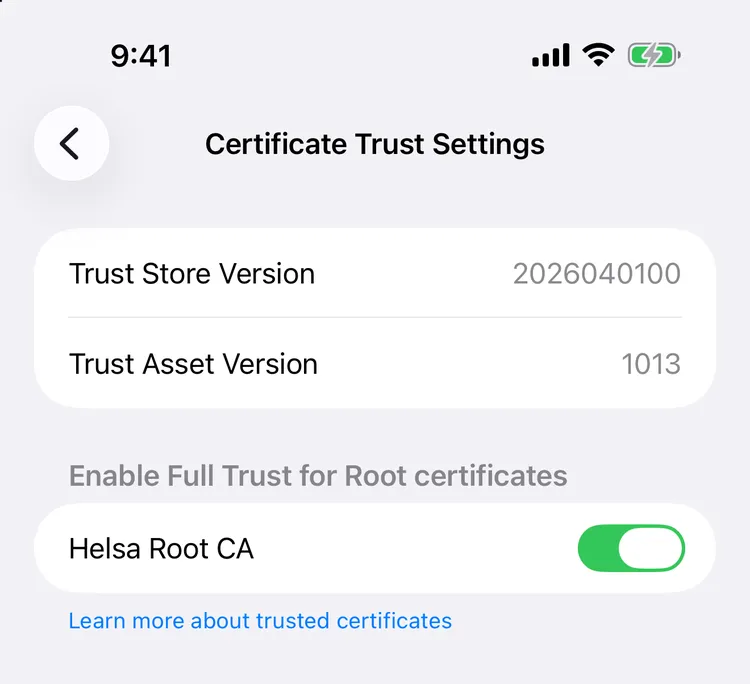
⚠️ The toggle is the whole point. Installing the certificate is not the same as trusting it: without that switch the app reports what looks like a network error, and nothing anywhere says the certificate is the reason.
2. <name>.p12 — so the phone can identify itself.
Import it the same way. It asks for the password that make client generated into
out/clients/<name>/p12-password.txt.
If iOS refuses the .p12, the encryption may be too new for the device; the PKI
README documents a -legacy variant. Use it only if you must — it falls back to
older, weaker ciphers.
The app also pins your CA rather than trusting the system trust store, so a certificate issued by any public CA is rejected out of hand.
Rotating
Section titled “Rotating”Three scenarios, in increasing order of danger.
Server certificate — yearly, safe
Section titled “Server certificate — yearly, safe”Nobody can be locked out: the phone trusts the CA, not the individual server certificate.
make server# copy to the server, restart the proxymake expiryKeep the previous server.crt and server.key until the new one is proven. Rolling
back is a file copy and a restart.
Client certificate — every two years, or on device replacement
Section titled “Client certificate — every two years, or on device replacement”make client NAME=iphoneIf a device was lost rather than replaced, replacing its certificate achieves nothing — the old one is still valid and still in someone’s pocket. Rotate the CA.
Root CA — every ten years, or after compromise
Section titled “Root CA — every ten years, or after compromise”The order is not optional:
- Move the old CA aside and generate a new one:
mv out/ca out/ca-old && make ca - Issue new server and client certificates from the new CA.
- Install the new
ca.crtand.p12on the phone, and enable trust. The phone still works at this point, because the proxy is still on the old CA. - Now replace
ca.crt,server.crt, andserver.keyon the proxy and reload. - Verify a real sync from the phone. If it fails, restore the old files from
out/ca-oldand reload — you are back where you started. - Only after a successful test, delete the old CA and the old identity.
The server side is always recoverable through SSH or the hypervisor console. The phone is the part that can get stranded, which is why it goes first.
No CRL, no OCSP
Section titled “No CRL, no OCSP”There is no revocation infrastructure, and this is a decision rather than an omission.
A certificate is a signed statement that stays true until it expires; revoking one requires an out-of-band channel telling verifiers it is dead. Both standard channels have real costs:
- CRL — a signed list published over HTTP. It must be re-signed and republished periodically even when empty. If it lapses, strict clients treat that as an error rather than as “nothing revoked”, and everyone locks themselves out weeks after the CA quietly stopped publishing.
- OCSP — a live responder answering per-certificate queries. It sees who connects to what and when. Hard-fail makes it a single point of failure for the whole service; soft-fail makes the check worthless, since anyone able to intercept traffic can also block the OCSP query. Stapling fixes this for server certificates only — client-side stapling is essentially unimplemented, so it does not help the case at hand.
The industry answer is short-lived certificates instead of revocation. That does not fit here, for the deadlock reason above.
So revocation here means rotating the CA. With one or two devices, all of them in your house, that is ten minutes of work. Revocation infrastructure starts paying off when you cannot reach every certificate holder in person.
Expiry is a silent failure
Section titled “Expiry is a silent failure”make expiryPrints days remaining for every certificate, flagging under 90 days and under 30.
An expired certificate does not produce an error message anywhere you look. The phone simply stops syncing, and because it buffers locally, the data is not lost — so nothing appears wrong until you go looking for last month’s numbers.
Two mitigations, and you want both:
- Put the expiry dates in a calendar.
make serverandmake clientprint them. - Run the freshness alert. It catches expiry, stale DNS, a dead worker, and a full disk with one mechanism, because all of them look identical from the outside: no new data.
Troubleshooting
Section titled “Troubleshooting”| Symptom | Cause | Fix |
|---|---|---|
| Phone says the connection is not secure | CA installed but trust not enabled | Certificate Trust Settings |
| Handshake fails, no HTTP status | Client certificate missing or from a different CA | openssl verify -CAfile out/ca/ca.crt out/clients/iphone/iphone.crt |
| Works by IP address, fails by hostname | The hostname is missing from the server certificate’s SAN list | Add it to server.cnf, make server, redeploy |
| Works by hostname, fails by IP | Expected. Caddy enforces strict SNI/Host matching once client authentication is configured. | Use the hostname. |
.p12 rejected by iOS |
Encryption algorithm | See the -legacy note above |
Lost ca.key |
It was not in the password manager | Full CA rotation. There is no other way. |