
First sync
Before you start
Section titled “Before you start”You need a running server (Quick start) and a device token (Device token).
If the phone will reach the server from outside your home network, you also need the certificate work in TLS and mutual TLS first — the public interface rejects connections without a client certificate at the TLS handshake, before any token is examined. If the phone is on the same LAN or on your VPN, you can do a first sync against the LAN interface and add certificates afterwards.
Turn on sending
Section titled “Turn on sending”Sending is off until you switch it on. Nothing has been uploaded so far, and if you never switch it on, nothing ever will be.
In the app’s settings, in the section for sending data to your own server:
- enable sending;
- enter the base URL of your server, including the
/v1prefix — for examplehttps://helsa.example.net/v1; - paste the device token;
- test the connection — the button is on that screen and sends one request without saving anything;
- save;
- ⚠️ restart the app. The connection is built at launch, so a saved setting does not take effect until then. The app says so under the field; this page used to leave it out, and the symptom is a device that never registers.
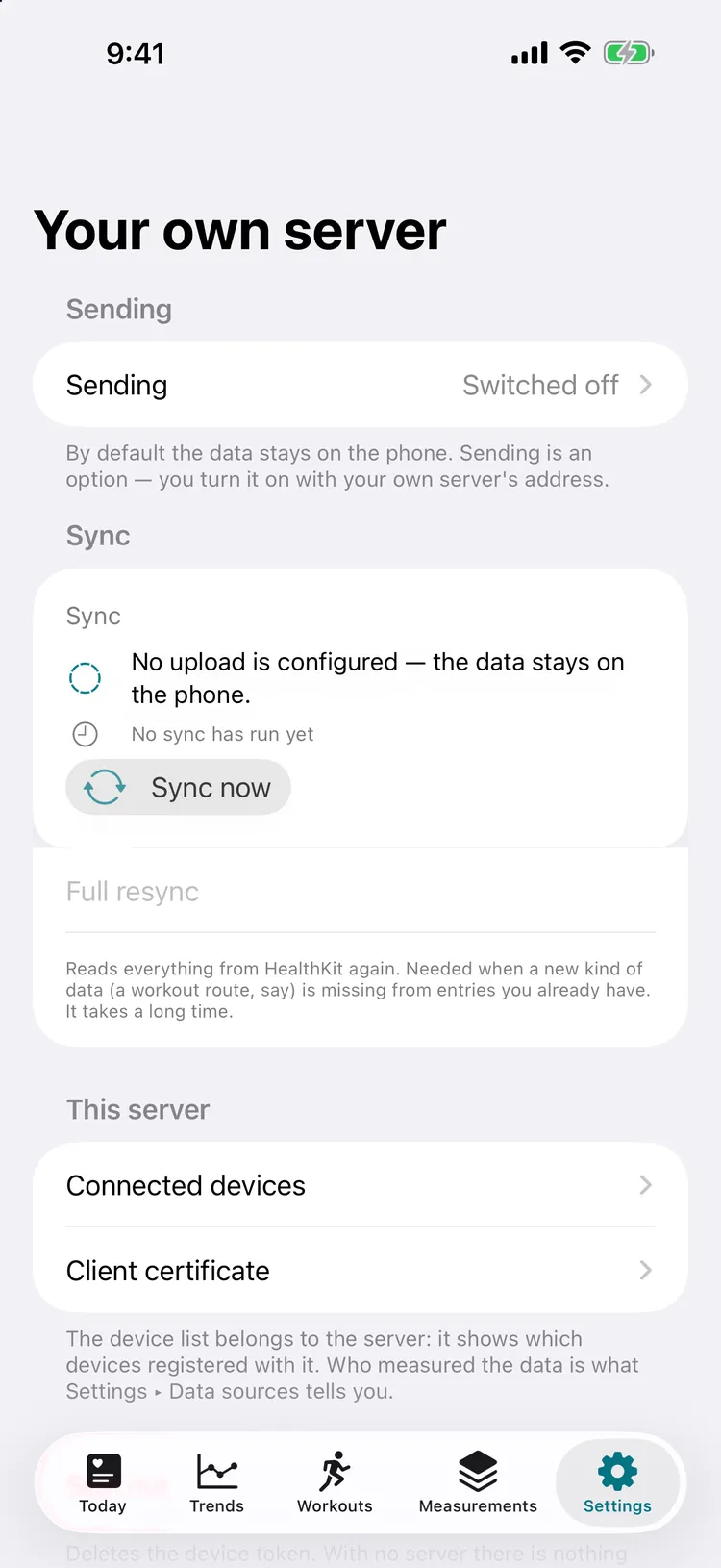
This is the screen those steps happen on. It opens with Sending switched off — that is the shipping default, not a screenshot of a fresh install: the data stays on the phone until you give it an address.
What the app does
Section titled “What the app does”The first sync is the big one; every later sync is a delta.
- HealthKit is queried with an anchored query. The anchor is an opaque cursor meaning “everything up to here has been handled”.
- The delta is cut into chunks — a few thousand items each, counting samples, workouts, sleep segments, activity summaries, route points, and deletions together.
- Each chunk is
POSTed to/v1/ingest. The server replies202 Acceptedafter it has taken the chunk, and processes it asynchronously through the queue. - Only after the
202does the app advance its anchor, and only for that chunk.
That last point is the whole design. If the connection dies mid-upload, the anchor
still points at the last acknowledged chunk, so the next attempt resumes there —
nothing is lost, nothing is uploaded twice in a way that matters. Ingestion is
idempotent anyway: every item carries its HealthKit source_uuid, which is the
deduplication key.
A phone that has been offline for weeks catches up by repeating this loop. Details: API — Ingest.
Verify it landed
Section titled “Verify it landed”Did a device register?
# Through the proxy, which is the only thing that publishes a port. `--cert`/`--key`# are your client certificate — the API is behind mutual TLS.curl -s --cert client.crt --key client.key --cacert ca.crt \ -H "Authorization: Bearer $TOKEN" \ https://helsa.example.net/v1/devices | jqYou should see one entry with a recent last_seen_at. That timestamp is also what
the staleness alert
watches.
Did samples arrive?
curl -s --cert client.crt --key client.key --cacert ca.crt \ -H "Authorization: Bearer $TOKEN" \ 'https://helsa.example.net/v1/summary?range=week&metrics=stepCount,heartRate&tz=Europe/Budapest' | jqWhat does the database say?
docker compose exec timescaledb psql -U helsa -d helsa -c \ "SELECT data_type, count(*), min(ts), max(ts) FROM samples GROUP BY 1 ORDER BY 2 DESC;"Is the worker keeping up?
docker compose logs -f workerThe worker logs what each batch contained — samples, workouts, sleep_segments,
activity_summaries, deletions — beside its size. ⚠️ Those are items received,
not rows changed: the writes are upserts, so a chunk replayed after a failed
acknowledgement reports the same numbers and stores nothing new. A growing queue with an idle worker means the worker cannot reach the
database or the broker — check /readyz.
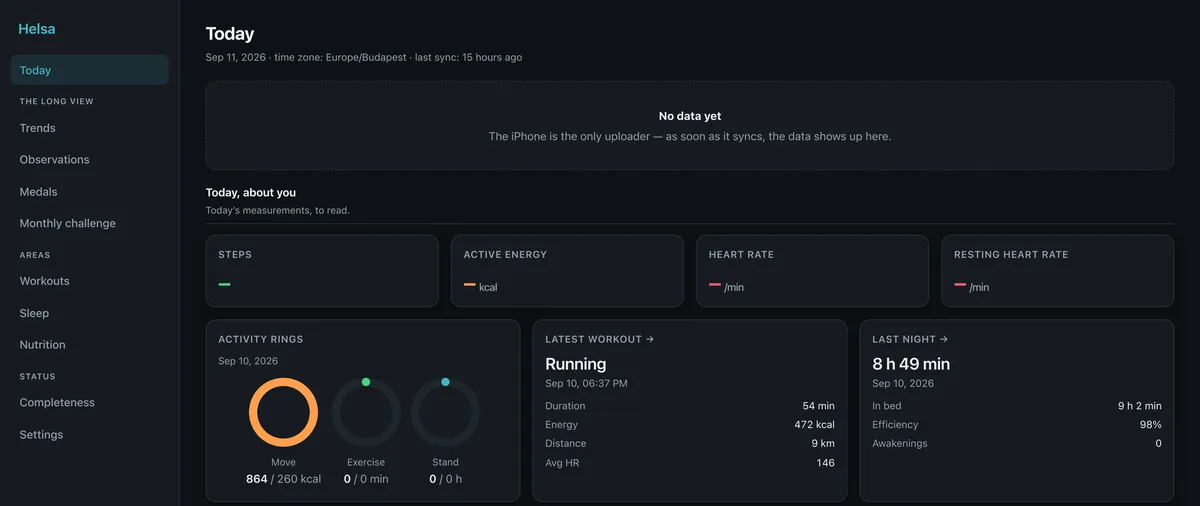
⚠️ Note what this picture actually shows: yesterday arrived — rings, a workout, a night’s sleep — and today has not, so today’s figures are dashes rather than zeros. That is the normal state between syncs, and it is the distinction the whole app is built on: a missing measurement is never drawn as a measured nought.
When it does not work
Section titled “When it does not work”| Symptom | Likely cause | Fix |
|---|---|---|
| App reports a TLS or “cannot connect” error | The CA certificate is installed on the phone but not trusted. Installing a root CA and trusting it are two separate steps on iOS. | Settings → General → About → Certificate Trust Settings, and enable it. See TLS and mutual TLS. |
| Connection refused at the TLS handshake, no HTTP status | No client certificate, or one signed by a different CA. | Reimport the .p12. Confirm with openssl verify -CAfile ca.crt client.crt. |
401 |
Token missing, mistyped, revoked, or signed with a different HELSA_JWT_SECRET. |
Issue a fresh token and paste it again. |
413 |
The chunk exceeded the server limit. | The app should shrink its chunk and retry; the 202 body advertises max_items. If it persists, the client-side chunk size is too large. |
202 but nothing in the database |
The worker is down, or the queue is unreachable. | docker compose ps, docker compose logs worker, curl /readyz. |
| Data arrives but daily totals look wrong | Time zone. Daily buckets are computed in a specific zone. | Set time_zone in settings to a valid IANA zone, or pass tz= explicitly. See API conventions. |
| Steps look roughly doubled | Both the iPhone and the Watch recorded them, and the server sums everything it received. | ⚠️ Not a fault, and not something the server can fix: HealthKit’s merged statistics exist only on the phone, so the dashboard, the MQTT sensors and the REST answers are all higher than what Health shows you. The samples table keeps source_device, so you can see which device contributed what. |
Then what
Section titled “Then what”- The phone keeps syncing in the background. It does not need you.
- Work through Deployment — the dashboard is served by the proxy, and the proxy does not start until the certificates exist.
- Then point a browser at the dashboard from your LAN or VPN.
- Set up the staleness alert — this system’s characteristic failure is not a crash but silence, and silence is invisible unless something watches for it.
- Take a backup and restore it once before you trust the setup: Backups and restore.