
Home Assistant (MQTT)
What this gives you
Section titled “What this gives you”Helsa publishes a small set of daily summary values to an MQTT broker, together with Home Assistant discovery messages. Home Assistant creates the entities by itself — no YAML, no custom integration, nothing to update when Home Assistant changes its API.
helsa worker ──▶ MQTT broker ──▶ Home Assistant (daily) (retained) (entities appear automatically)The publisher is part of the worker, not a separate service: it is a handful of small queries a few times a day against a database the worker already has open. It is off unless you configure a broker, and a broker that is unreachable costs it a line in the log rather than the process — ingestion does not depend on your home automation being up.
Requirements
Section titled “Requirements”- An MQTT broker on your network (Mosquitto is the usual choice).
- The MQTT integration configured in Home Assistant, with discovery enabled — it is
on by default, using the
homeassistant/prefix. - Credentials for the broker, kept in
.envon the Helsa host and insecrets.yamlon the Home Assistant side.
Configuration
Section titled “Configuration”In deploy/.env:
HELSA_MQTT_URL=mqtt://helsa:CHANGE_ME@mqtt.lan:1883That one line is the switch. Leave it out and nothing connects, nothing is published, and no broker is needed. Everything else has a working default:
| Variable | Default | What it does |
|---|---|---|
HELSA_MQTT_URL |
(empty) | Broker URL. Empty means the publisher does not start. mqtt://, mqtts://, tcp://, ws:// and wss:// are understood; credentials go in the userinfo part. |
HELSA_MQTT_PREFIX |
helsa |
Topic root for Helsa’s own topics. |
HELSA_MQTT_DISCOVERY_PREFIX |
homeassistant |
Home Assistant’s discovery root. Change it only if you changed it in Home Assistant. |
HELSA_MQTT_PUBLISH_INTERVAL |
6h |
How often the daily summaries are republished. |
HELSA_MQTT_FRESHNESS_INTERVAL |
15m |
How often the heartbeat is published. |
HELSA_MQTT_EXPIRE_AFTER |
90m |
How long Home Assistant waits before calling the heartbeat unavailable. Keep it a comfortable multiple of the interval above. |
HELSA_MQTT_CLIENT_ID |
helsa |
MQTT client identifier. |
HELSA_MQTT_USER_ID |
(empty) | Which user’s numbers to publish. Only needed if the database holds more than one. |
Restart the worker and the entities appear.
Topics
Section titled “Topics”helsa/status online | offline (retained, LWT)helsa/daily/steps 8214helsa/daily/active_energy 512helsa/daily/sleep_hours 7.3helsa/daily/resting_heart_rate 54helsa/daily/rings_closed 3helsa/sync/freshness_hours 0.2 (NOT retained)helsa/sync/attributes {"newest_data": "...", "future_skew_s": 0, ...}The daily state messages are retained, so Home Assistant restores the last
value after a restart instead of showing unknown until the next publish. The
freshness topics deliberately are not — see below.
helsa/status is a last-will message: the broker publishes offline on its own if
the publisher disconnects unexpectedly. Entities referencing it as
availability_topic grey out rather than showing a stale number.
What “no data” looks like
Section titled “What “no data” looks like”A measurement that has not arrived is published as the literal payload None,
which Home Assistant turns into the state unknown for a numeric sensor.
Discovery
Section titled “Discovery”One retained message per entity, on homeassistant/sensor/<object_id>/config.
Helsa publishes these on every connection, and again whenever Home Assistant
announces its own restart on homeassistant/status. You do not have to write
them; they are here so you can recognise them in Home Assistant’s MQTT debug view.
homeassistant/sensor/helsa_steps/config:
{ "name": "Steps today", "unique_id": "helsa_steps", "object_id": "helsa_steps", "state_topic": "helsa/daily/steps", "unit_of_measurement": "steps", "state_class": "total_increasing", "icon": "mdi:walk", "availability_topic": "helsa/status", "device": { "identifiers": ["helsa"], "name": "Helsa", "manufacturer": "Helsa", "model": "Self-hosted health backend" }, "origin": { "name": "helsa", "support_url": "https://github.com/nordic-sys/helsa" }}The full set:
| Entity | Topic | Unit | State class |
|---|---|---|---|
sensor.helsa_steps |
helsa/daily/steps |
steps | total_increasing |
sensor.helsa_active_energy |
helsa/daily/active_energy |
kcal | total_increasing |
sensor.helsa_sleep_hours |
helsa/daily/sleep_hours |
h (device_class: duration) |
measurement |
sensor.helsa_resting_heart_rate |
helsa/daily/resting_heart_rate |
bpm | measurement |
sensor.helsa_rings_closed |
helsa/daily/rings_closed |
— | measurement |
sensor.helsa_sync_freshness |
helsa/sync/freshness_hours |
h | measurement |
Sharing one device block groups every entity under a single Helsa device in the
Home Assistant UI.
How the numbers are cut
Section titled “How the numbers are cut”- Steps and active energy are today’s totals in your timezone, the one in your Helsa settings — the same cut the dashboard uses, so the two cannot disagree.
- Sleep is the most recent sleep session, not “sleep on today’s date”:
sleep crosses midnight, and a calendar-day cut would split one night into two
half-nights. A gap of more than three hours starts a new session, so an
afternoon nap does not merge into last night. It counts time asleep, not time
in bed — the
inBedandawakestages are excluded. Where two sources (the phone and the watch) describe the same night, the overlap counts once: the published figure is the union of the sleep stages, not the sum of the segments, which would be about one and a half times as long. - Rings closed counts how many of Move, Exercise and Stand reached their goal
today. If any of the three has no goal set, the whole count is published as
None: “0 of 3 closed” told to somebody who never set a Move goal is a lie an automation would act on.
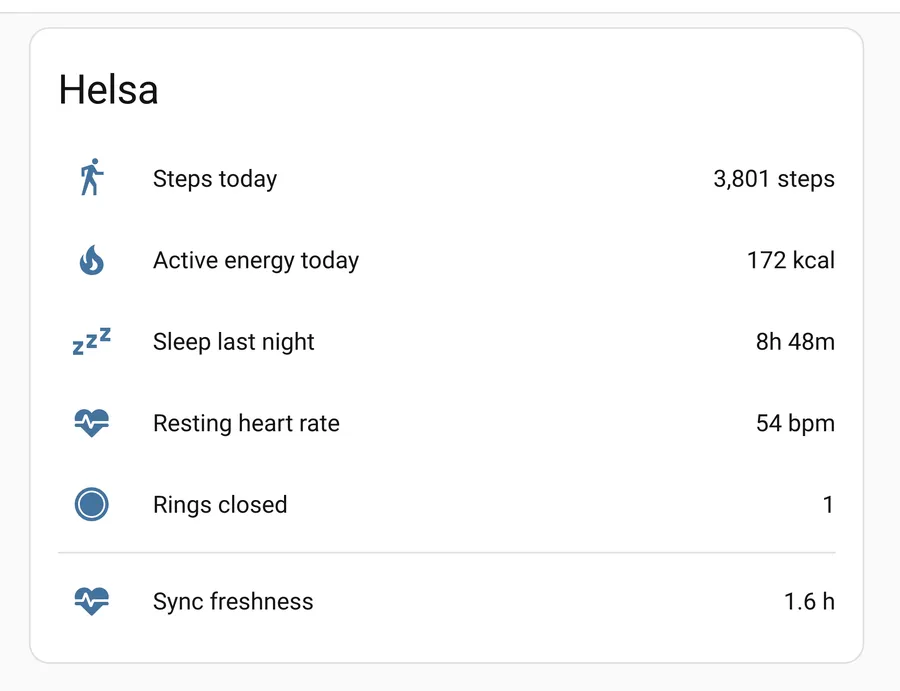
The card above is the six entities as Home Assistant shows them. ⚠️ Note the
divider: the five measurements are what Helsa knows, and Sync freshness is
whether any of them can still be believed. A step count that stopped updating
looks exactly like a day spent sitting down — that sensor is the difference, and
it is why the integration publishes it at all.
The alert that matters
Section titled “The alert that matters”Everything above is convenience. This part is the reason the integration exists.
Helsa’s characteristic failure is not a crash — it is silence. An expired client certificate, a stale dynamic-DNS record, a dead worker, a full disk, and a powered-off host all look identical from outside: no new data, no error, nothing in a log you were watching. The app keeps buffering, so you do not even lose data. You just stop noticing, for weeks.
Build it as a dead man’s switch
Section titled “Build it as a dead man’s switch”The freshness value is the age, in hours, of the newest data — the later of the newest sample timestamp and the last heartbeat from the uploading device.
homeassistant/sensor/helsa_sync_freshness/config:
{ "name": "Helsa sync freshness", "unique_id": "helsa_sync_freshness", "state_topic": "helsa/sync/freshness_hours", "unit_of_measurement": "h", "state_class": "measurement", "icon": "mdi:heart-pulse", "expire_after": 5400, "json_attributes_topic": "helsa/sync/attributes"}Three deliberate absences and one deliberate presence, all of them load-bearing:
expire_after: 5400is what makes it a dead man’s switch: if no message arrives for 90 minutes, Home Assistant marks the entityunavailableby itself.- No
availability_topic. If the publisher’s last will marked this entity unavailable, the expiry would be masked — and the expiry is the whole alert. - The state is not retained. Home Assistant’s own documentation warns that a retained state is replayed by the broker on restart, which would resurrect an expired sensor with a stale value. Home Assistant restores the state itself and keeps track of the remaining expiry time.
- The attributes carry
newest_data(the raw timestamp the age was computed from) andfuture_skew_s. The latter exists because the age is clamped at zero: if a clock is wrong and the newest data is dated ahead of now, a negative age would never cross an “above 12” threshold and would silently switch the alert off. The clamp fixes that, and the attribute makes sure the clamp itself is not hiding anything — for the duration of the skew, real staleness is hidden too.
The automation
Section titled “The automation”automation: - alias: Helsa sync stalled trigger: # 1. The data itself is old. - platform: numeric_state entity_id: sensor.helsa_sync_freshness above: 12 for: "00:30:00" # 2. Nothing is publishing at all — the host or the publisher is gone. - platform: state entity_id: sensor.helsa_sync_freshness to: "unavailable" for: "00:30:00" action: - service: notify.mobile_app_your_phone data: title: Helsa is not syncing message: >- {% raw %}{% if is_state('sensor.helsa_sync_freshness', 'unavailable') %} No heartbeat from the Helsa host for over 90 minutes. {% else %} Newest health data is {{ states('sensor.helsa_sync_freshness') }} hours old. {% endif %}{% endraw %}A second automation worth having, on the attribute:
- alias: Helsa clock skew trigger: - platform: numeric_state entity_id: sensor.helsa_sync_freshness attribute: future_skew_s above: 300 action: - service: notify.mobile_app_your_phone data: title: Helsa data is dated in the future message: "A clock is wrong; the freshness alert is blunted while it lasts."Test it
Section titled “Test it”An untested alert is a decoration.
- Stop the worker. Within 90 minutes plus 30, the notification should arrive.
- Set the freshness value above 12 by hand (Developer Tools → States) and confirm the first trigger fires.
- Start it again and check that the entity recovers.
Trying it without a broker of your own
Section titled “Trying it without a broker of your own”The repository ships a throwaway Mosquitto behind a Compose profile, so docker compose up never starts one:
cd deploy && make mqtt-up                 # 127.0.0.1:1883, anonymous, no TLSmake mqtt-watch                           # print everything on the broker
cd ../backend && HELSA_MQTT_URL=mqtt://127.0.0.1:1883 make smokecd ../deploy && make mqtt-down
The smoke test subscribes as Home Assistant would and checks that the discovery
messages arrive, that a late subscriber gets the retained ones (which is what makes
the entities survive a Home Assistant restart), that the freshness state is not
among them, and that a birth message on homeassistant/status brings the discovery
back. Without a broker configured, that test skips.
Watch out for
Section titled “Watch out for”| Recorder growth | Even daily entities add up over years. Home Assistant’s default purge is 10 days; if you want longer history, use long-term statistics rather than raising the purge window. |
| A second copy of your data | Whatever you publish now lives in Home Assistant’s database too, with its own backups and possibly its own remote access. |
| Broker credentials | In secrets.yaml on the Home Assistant side, in .env on the Helsa side, and in neither git repository. |
| Clock skew | Handled — the age is clamped at zero and future_skew_s reports the cause. Alert on the attribute; a blunted alert is worth knowing about. |
| Timing | Publishing more than a few times a day gains nothing. These are daily numbers. |
| Retained messages outlive the publisher | If you change HELSA_MQTT_PREFIX, the old topics stay on the broker and the old entities stay in Home Assistant. Clear them by publishing an empty retained payload to each config topic. |